

Brother LC101BK Ink Cartridge: 4 Colors for Reliable Everyday Printing Leave a comment
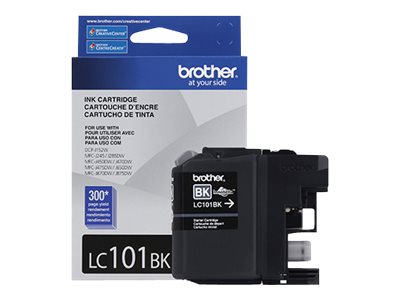
The Brother LC101BK ink cartridge is a standard-yield black ink cartridge for compatible Brother inkjet printers, including the Brother MFC-J285DW. With an approximate yield of 300 pages, it is a practical replacement option for everyday document printing at home, in offices, and in business environments.
Available from OSSSINC, this Brother LC101 ink cartridge listing includes four color variations: black, cyan, magenta, and yellow. Buyers can select the required cartridge by color and manufacturer part number, making it easier to identify the correct replacement for their printer.
OSSSINC (One Stop Shop Solutions Inc.) is a USA-based, SAM-registered supplier serving business customers, educational institutions, and government buyers. Whether you need an individual replacement cartridge or want to include printer consumables in a larger office supply request, OSSSINC offers product sourcing and quotation support.
Table of Contents
Brother LC101BK Ink Cartridge Overview
The Brother LC101BK is the black cartridge in Brother’s LC101 standard-yield ink family. It is designed for compatible Brother inkjet multifunction printers and supports everyday printing tasks such as letters, invoices, business reports, forms, worksheets, and administrative documents.
This listing is organized around the black LC101BK cartridge, with three additional color options available as variations. Instead of navigating separate product listings for each color, shoppers can select the cartridge they need from the product variation selector.
Key product features
- Manufacturer: Brother
- Primary manufacturer part number: LC101BK
- Primary OSSSINC SKU: BRTLC101BK
- Ink color: Black
- Printing technology: Inkjet
- Cartridge family: LC101
- Approximate page yield: Up to 300 pages
- Product classification: OEM, according to the supplied catalog
- Unit of measure: Each
Brother specifies an approximate 300-page yield for the LC101 standard-yield cartridges under ISO/IEC 24711 testing conditions. Actual yield depends on print coverage, document type, printer settings, and usage.
Available Brother LC101 Ink Cartridge Colors
Choose the appropriate variation before adding the product to your cart. Each color has its own manufacturer part number and OSSSINC catalog SKU.
1. Brother LC101BK Black Ink Cartridge
The LC101BK black ink cartridge is intended for compatible printers that require black LC101 ink. It is suitable for everyday text documents, correspondence, reports, and business paperwork.
- Manufacturer part number: LC101BK
- OSSSINC SKU: BRTLC101BK
- Catalog list price: $23.50
- Approximate yield: 300 pages
- UPC: 012502635796
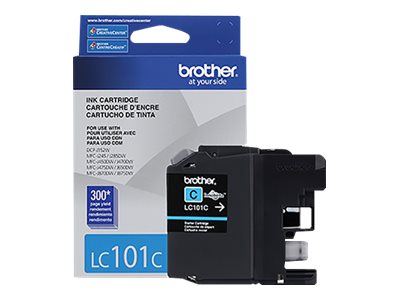
2. Brother LC101C Cyan Ink Cartridge
The LC101C cyan ink cartridge supplies cyan ink for compatible color-printing applications. Choose this variation when the cyan cartridge needs replacement.
- Manufacturer part number: LC101C
- OSSSINC SKU: BRTLC101C
- Catalog list price: $15.00
- Approximate yield: 300 pages
- UPC: 012502635802
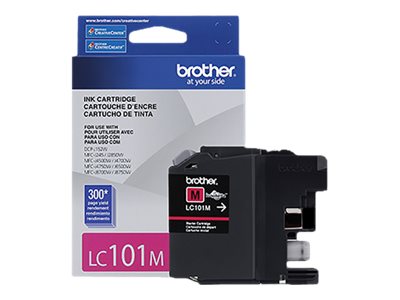
3. Brother LC101M Magenta Ink Cartridge
The LC101M magenta ink cartridge is the magenta option in the same standard-yield cartridge family. It is intended for compatible Brother printers that use LC101M.
- Manufacturer part number: LC101M
- OSSSINC SKU: BRTLC101M
- Catalog list price: $15.00
- Approximate yield: 300 pages
- UPC: 012502635819
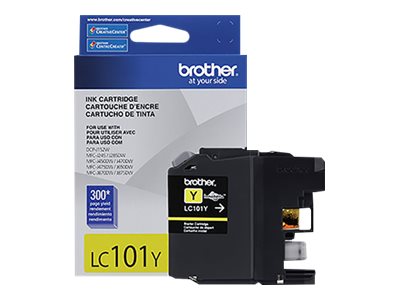
4. Brother LC101Y Yellow Ink Cartridge
The LC101Y yellow ink cartridge provides the yellow option for compatible LC101-series printers. Select this variation when your printer requires replacement yellow ink.
- Manufacturer part number: LC101Y
- OSSSINC SKU: BRTLC101Y
- Catalog list price: $15.00
- Approximate yield: 300 pages
- UPC: 012502635826
Prices above come from the supplied product catalog. Confirm the current displayed price, stock status, and ordering terms on OSSSINC before purchase.
Compatible Brother Printer Models
The Brother LC101 ink cartridge family is listed for the following compatible printer models:
- Brother DCP-J152W
- Brother MFC-J245
- Brother MFC-J285DW
- Brother MFC-J450DW
- Brother MFC-J470DW
- Brother MFC-J475DW
- Brother MFC-J650DW
- Brother MFC-J870DW
- Brother MFC-J875DW
These models are listed in Brother’s official LC101 cartridge compatibility information. For example, Brother identifies the LC101BK as a standard-yield black cartridge for the MFC-J285DW and other models in the list.
Before ordering, check the complete model number printed on your machine and verify the required cartridge series. A similar-looking cartridge from another Brother product family may not be interchangeable.
Brother LC101 Ink Cartridge Specifications
| Specification | Details |
|---|---|
| Brand | Brother |
| Product family | LC101 |
| Product category | InkJet Ink |
| Technology | Inkjet |
| Black cartridge | LC101BK |
| Cyan cartridge | LC101C |
| Magenta cartridge | LC101M |
| Yellow cartridge | LC101Y |
| Approximate yield | 300 pages per cartridge |
| OEM / compatible classification | OEM, according to supplied catalog |
| Unit of measure | Each |
| Country of origin | Philippines, according to supplied catalog |
| Black UPC | 012502635796 |
| Cyan UPC | 01250235802 |
| Magenta UPC | 01250235819 |
| Yellow UPC | 01250235826 |
The Arlington catalog lists a weight of 0.134 lb for the black cartridge and 0.114 lb for each color cartridge. Confirm the UPC values against the original catalog or product packaging before importing them, as accurate identifiers are important for product feeds and procurement records.
How to Choose the Correct Brother Ink Cartridge
Choosing the correct printer ink begins with checking three things.
1. Identify your printer model. Find the model number on the front, rear, or control panel of your Brother printer. Compare it with the compatible models above.
2. Check your existing cartridge number. Look for LC101BK, LC101C, LC101M, or LC101Y on your existing cartridge or its packaging. Match the replacement to the number required by your machine.
3. Select the required color. Choose black for the black cartridge or the matching cyan, magenta, or yellow variation for color printing.
Do not select a cartridge based only on its appearance. Brother also offers other cartridge families, including LC103, which has different yield specifications. Verify compatibility before ordering a replacement.
Benefits for Offices and Business Buyers
Maintaining the right printer consumables helps organizations reduce purchasing confusion and keep routine document workflows moving.
For small and medium-sized businesses
Offices can identify the required cartridge using its manufacturer part number and maintain a record of repeat purchases. The four color variations also make it easier to distinguish black ink from color replacements.
For schools and educational institutions
Compatible ink cartridges can support everyday administrative printing, classroom worksheets, notices, reports, and other documents. Purchasing teams should verify printer compatibility and quantity requirements before submitting an order.
For IT and facilities teams
Part numbers and SKU records help purchasing staff communicate accurate requirements to suppliers. Including the model number, cartridge color, quantity, and delivery requirements in a request for quotation can help reduce ordering errors.
For bulk and repeat purchasing
Organizations buying several types of printer supplies can consolidate product requirements into one request for quotation. Contact OSSSINC with the relevant manufacturer part numbers, quantities, and delivery location to discuss sourcing and available pricing.
Government and Institutional Procurement Through OSSSINC
OSSSINC is a USA-based supplier with an active SAM registration, as represented on its website. The company supports business-to-business and business-to-government purchasing, including quotation requests and purchase orders.
Supplier details
- Company: One Stop Shop Solutions Inc. (OSSSINC)
- SAM registration: Active, as stated on the company website
- CAGE code: 9ME14
- Unique Entity ID (UEI): QGV1XE1RXLN4
- Business focus: IT equipment, printer supplies, office products, janitorial supplies, industrial products, and facility essentials
- Contact: [email protected]
- Telephone: +1 (302) 567-4434
Government purchasing teams, schools, and private-sector buyers can use the OSSSINC website to review product categories, submit inquiries, and request quotations for their requirements.
For a quotation, provide the LC101 cartridge part numbers, required colors, quantities, destination, and requested delivery timeline. OSSSINC can review the request and advise on available sourcing, pricing, and shipping arrangements. Purchase orders and Net 30 terms may be available to eligible customers subject to approval and applicable terms.
SAM registration identifies a supplier’s registration status; it does not by itself establish that a particular product is approved for every government contract or meets a specific procurement compliance requirement. Buyers should verify any contract-specific requirements, including country-of-origin or trade compliance conditions, before ordering.
To learn more, visit OSSSINC’s official website or review the official System for Award Management website.
Frequently Asked Questions
1. What is the Brother LC101BK ink cartridge?
The Brother LC101BK is a standard-yield black ink cartridge designed for compatible Brother inkjet printers. Its approximate rated yield is 300 pages.
2. How many pages can Brother LC101BK print?
Brother rates the LC101BK at up to approximately 300 pages under ISO/IEC 24711 testing conditions. Actual page yield varies with print coverage and usage.
3. Which colors are available in the LC101 series?
This listing includes black LC101BK, cyan LC101C, magenta LC101M, and yellow LC101Y. Select the required color from the product variations.
4. Which Brother printers use LC101 cartridges?
Compatible models include DCP-J152W, MFC-J245, MFC-J285DW, MFC-J450DW, MFC-J470DW, MFC-J475DW, MFC-J650DW, MFC-J870DW, and MFC-J875DW. Verify the cartridge requirement for your exact printer model.
5. Is LC101 the same as LC103?
No. LC101 is the standard-yield family, rated at approximately 300 pages per cartridge. LC103 is a higher-yield family rated at approximately 600 pages for the relevant compatible models. Check the manufacturer’s specifications before choosing.
6. Can I order only the black LC101BK cartridge?
Yes. Select the black LC101BK variation if that is the cartridge required by your printer. Review the current listing for availability and pricing.
7. Can businesses request a quotation for multiple cartridges?
Businesses and institutional buyers can contact OSSSINC with their required part numbers, quantities, and delivery details to request a quotation. Pricing, stock, and shipping arrangements should be confirmed before placing an order.
8. Is OSSSINC registered with SAM.gov?
OSSSINC identifies itself as a SAM-registered supplier on its website. Buyers can verify the entity’s current registration status through the official SAM.gov system using the relevant business details.
9. Is this cartridge automatically TAA-compliant for government purchasing?
Do not assume that it is. The supplied catalog does not establish TAA compliance for this product. Government buyers should obtain the required product-specific documentation and verify the applicable solicitation requirements before purchase.
Order Brother LC101 Ink Cartridges from OSSSINC
The Brother LC101BK ink cartridge provides a clearly identifiable replacement option for compatible Brother inkjet printers. With black, cyan, magenta, and yellow variations, this product listing helps shoppers find the correct cartridge by color and part number.
For businesses, schools, purchasing departments, and government buyers, OSSSINC provides a supplier contact point for product inquiries and quotation requests. Verify printer compatibility, current pricing, availability, and any applicable purchasing requirements before ordering.
Need a quotation for Brother LC101 ink cartridges or other office supplies? Visit OSSSINC to explore the catalog or contact the team at [email protected] or +1 (302) 567-4434.
